---
title: Introduction
description: Manage user roles and permissions with SuperTokens.
sidebar:
order: 1
---
## Overview
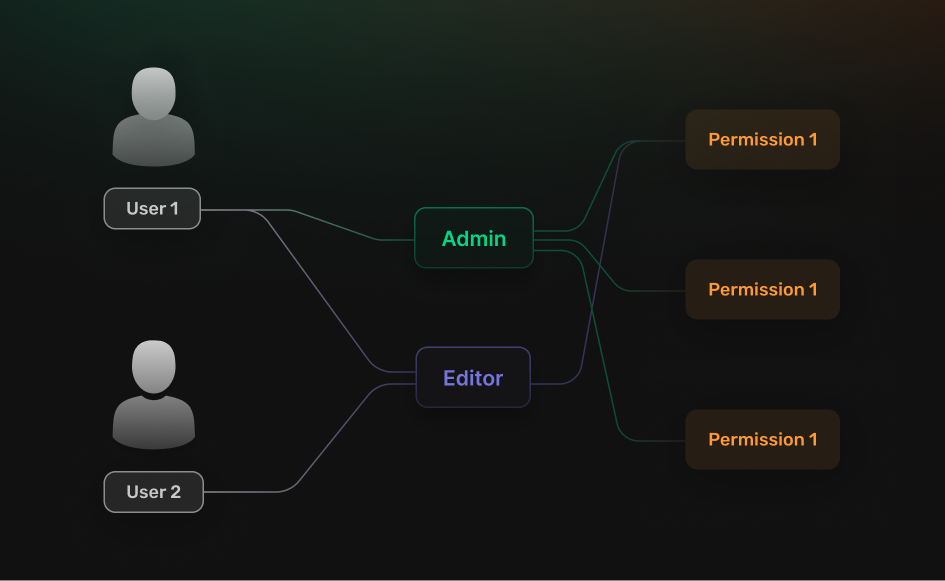
**SuperTokens** provides a way to set different levels of authorization control through the `User Roles` feature.
With it, you can create roles and permissions, assign them to your users and limit access based on your application logic.
 ## Getting started
You can go through the *Initial Setup* page for a quick tutorial on how to configure the feature.
Go through a quick tutorial that shows you how to add the **Email Verification** recipe to your application.
## Customization
To adjust the functionality to fit your use case you can explore different sections from the documentation.
Limit the access to your frontend and backend routes based on roles and permissions.
Create new roles and permissions, assign them to users and manage them.
## Getting started
You can go through the *Initial Setup* page for a quick tutorial on how to configure the feature.
Go through a quick tutorial that shows you how to add the **Email Verification** recipe to your application.
## Customization
To adjust the functionality to fit your use case you can explore different sections from the documentation.
Limit the access to your frontend and backend routes based on roles and permissions.
Create new roles and permissions, assign them to users and manage them.